Lumen Bible · Direct signed-out web capture
Verse-aligned columns retain different line wrapping
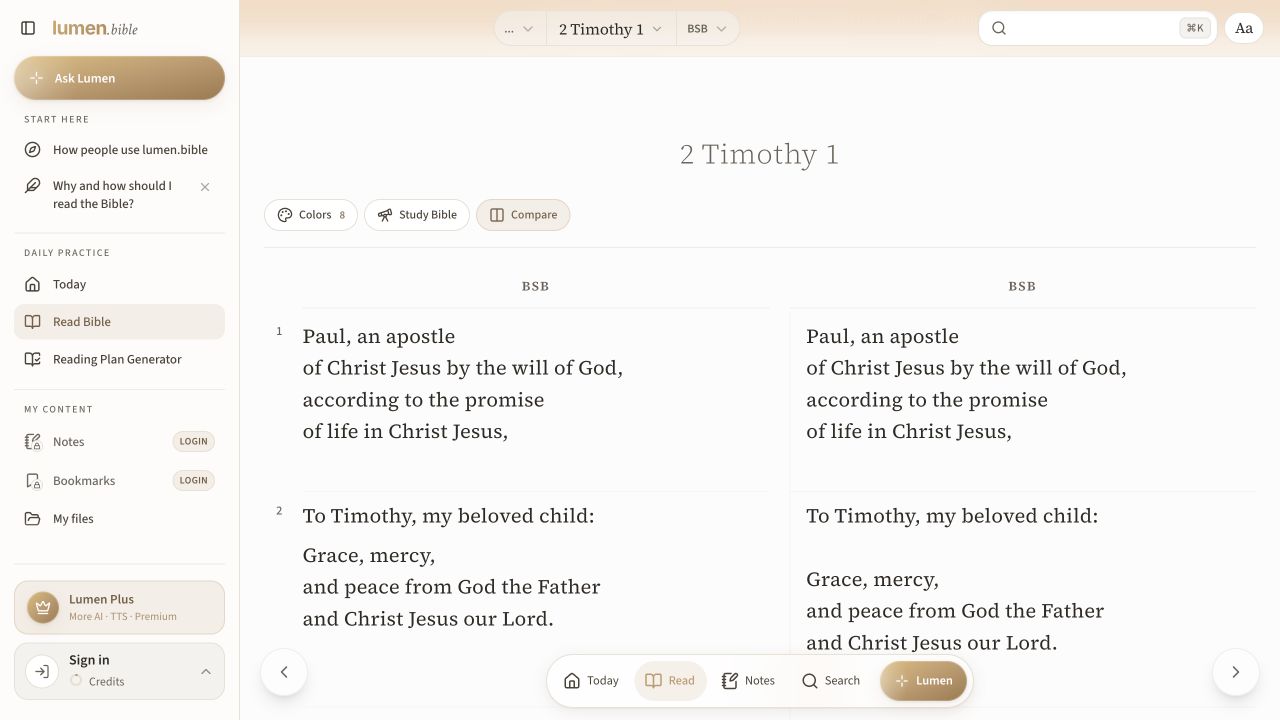
Activating Compare changes the chapter reader into two verse-aligned columns. Both columns initially show BSB; the capture shows differing line wraps inside matching verse rows.
Design takeaway
Align reference units rather than raw pixel positions. Preserve edition labels and make it clear when the same edition is displayed twice.
What this example establishes
Activating Compare changes the chapter reader into two verse-aligned columns. Both columns initially show BSB; the capture shows differing line wraps inside matching verse rows.
Limits and further verification
The same-edition initial state was observed. Changing an edition, linked scrolling, mismatched versification and mobile behaviour were not exercised. This screenshot does not establish comparison of different translations.
Provenance
- Platform
- Desktop web · English interface
- Image origin
- Direct signed-out web capture
- Source or capture date
- 5 October 2026
- Reviewed
- 5 October 2026
- Version
- Web interface observed on the capture date
Compare the relevant patterns
Group editions around a shared verse
Use repeated verse groups when matching corresponding passages matters more than continuous reading.
Research-informed design proposal53 · Study and annotationsParallel reading chooses a useful arrangement
Compare translations without forcing a desktop layout onto a small screen.
Research-informed design proposal07 · Study and annotationsCompare without flattening
Show differences while keeping edition and reference identity intact.
Research-informed design proposal